Showing posts with label Cricut. Show all posts

Thursday, October 10, 2019

14" Pebbles Paper Piecing

Good morning & happy Thursday!!!  On Monday I posted a video on IG of me putting together a paper cut out of Pebbles.  I am going to share with you how it was done.


Tools Needed:

Pebbles SVG File
Cricut
Cardstock
Adhesive


So I started by sizing my file to my liking.  I wanted her to be 14".  So I am a bit anal on placement when it comes to paper crafting.  So I sometimes like to score my project first before cutting.  See the video below.


You will be able to see where each individual piece goes. This is extremely helpful when you have a million pieces to place. My lighting wasn't so great but you can kinda see where the score lines are.


Here is a quick video of me assembling Pebbles.


This is how your finished project will look.


If you are wondering which adhesives I used, here they are. 


Scotch ATG tape gun & the Zig 2way glue pen. I also used the Silhouette pick-me-up tool for my smaller pieces.  These are 3 of my top 5, most used craft supplies. Click on the links below to purchase on Amazon. However, you can also purchase these in any craft store, using a coupon!


I hope that this was helpful!  If you have any questions, feel free to contact me!

XoXo
Crafting w/ Meek


Wednesday, September 25, 2019

Stacked Pumpkins Fall Decor


Hopefully everyone is having an awesome and productive week!! I have been working on fall crafts for my house.  Fall is my absolutely favorite time of the year.  The colors are magnificent, the weather gives me all the feels, and my PSL soothes my soul!  With that said, I want to share with you guys a quick, easy, and super cheap fall home decorative piece. 

Supplies Needed

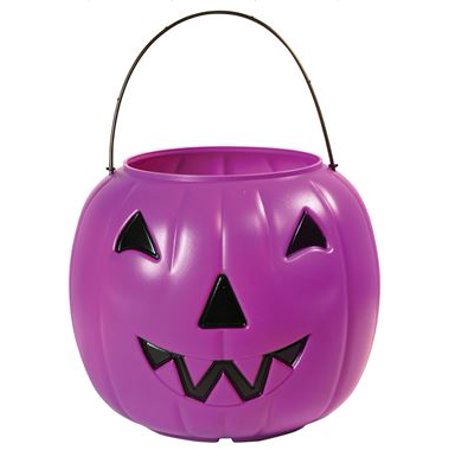
1.  Plastic Pumpkin Buckets

I purchased mine from Walmart for $.99 I think they can only be purchaed in the store but I am posting the link to the webiste below.

2.  Spray Paint
Your color preference of course.  I used a metallic gold.  Just make sure that it will bond to plastic.

3.  You will also need a sealer once you're finished painting them.  This is the one I used but of course it's totally up to you. 

4. You will aslo need an adehsive to stack the pumpkins togteher.  I used hot glue and it worked perfectly fine.  I am sure you can use E600 or any other adhesive that will bond plastic.

5.  Vinyl
I used my Cricut Maker to cut words for my pumpkins.  I used Cricut Adhesive Foil.  Which is actually on sale right now.  Click Here to buy the one I used or to check out other options.  This is an affiliate link.  Buying through the link will cost nothing extra to you, but will send a little something my way!  Thank you in advance.


6.  Lastly you will need something to put into the top of the open bucket.  I chose to use faux flowers, the I purchased from the good ole' Dollar Tree!  Remember I mentioned this was a super cheap diy!   Click Here to purchases the flowers!  I suggest just going into the store to get them, unless you need a huge bulk.


First you will start off by removing the handles from the buckets. 


Now its time to stack them and glue them together. Make sure all of the faces are facing the same direction.


Spray Paint Time


I did maybe 3 layers.  I just wanted to make sure that you could'nt see any of original pink color.  After it was completely dry I put on two layers of the semi-gloss clear sealer.  I actually let that dry overnight.  I did this to make sure the transfer tape would  not cause the paint to peel when it was time to apply the vinyl decal.

I cut decals in Design Space, with the Crircut Maker.


Next I applied the decals to the pumpkins, added the flowers, and some cute fall theme ribbon.


Here is the finished product. 


Disclaimer:  I am not a floral designer.  I am a paper crafter so don't judge me! Lol 

I hope this has helped you as much as possible!  If you have any qustions, please do not hesistate to reach out.

You can find/contact me on: 


XoXo
Crafting w/ Meek


Monday, February 24, 2014

Dr. Seuss - Thing 1 and Thing 2


Cartridges used:
Hair: Paper Doll Dress Up
Mouth: Funny Faces
Head: Cricut Font & Basic Shapes
Outfit: Paper Dolls for Everyday
Font: Lyrical Letters (Basic)
Circle Patch: Cricut Font & Basic Shapes

Until next time....

XoXo
Mrs. Houston


Sunday, February 16, 2014

Happy Valentine's Day!!!

I hope everyone enjoyed Vday with their love bugs!  Mine was awesome as always!!  So this year both of my girls are in school....so imagine how many Valentines I had to put together....BUT it was tons of fun.

Here is what I made for my 4 year old PreK class.


...and my 7 year old...

and I also made these for her teachers....

I also made a little treat for the girls bus drivers & my school volunteer buddies.  I didn't take a pic...wait I just thought about it I think I have a few left!!  I will post a pic later!!  Next up St. Patricks Day!!!  Stay tuned!!

Until next time....
XoXo
Mrs. Houston


Monday, January 20, 2014

American Girl Doll Birthday

So my daughters BFF turned 7 back in December.  She had an American Girl doll theme birthday party.  Her mom asked me to make her banner....and of course I said YES!!!!  Here are a few pics.


Until next time....

XoXo
Mrs. Houston

Sunday, January 19, 2014

Update!!

Hello blogging buddies!!!!!  Thought I would give you all a little update with whats been going on in my world before I head out to church!!  Well I have been very busy!!!  I have had to have emergency surgery, I went to Florida for Christmas (which was aweome), I celebrated my 5th wedding anniversary, I have been crafting for others as well as myself...l have just been all over the place!!!  So oh wait I don't think I told you guys that I purchased the Cricut E2 back in November!  I have had my Cricut mini for 2 years I think!!  But boy do I love my E2!!  Well...I am in the process of starting an Etsy page, I am also trying to get my Tumblr up and running!!  So yeah.....I have a lot going on, so my blogging seems to keep falling to the back of the line of things to do!!  I am going to try and do better.  Please be patient with me!!  In the meantime....if you havent already follow me on here, pinterest, facebook, and instagram!  Here are the links:

Facebook

Instagram

Pinterest

Until next time.....

XoXo

Mrs. Houston

Saturday, December 28, 2013

Bee Baby Shower Banner Cut File


Cartridges Used:

Cricut Font and Basic Shapes
Lyrical Letters

Until next time.....
XoXo

Mrs. Houston

Candy Shop Theme Birthday Party

So my daughter turned the BIG 7!!!  We love doing parties, coming up with ideas, and having all of her friends over for a grand ole' time.  This year we went with a candy shop theme.  I am not big on letting my kids indulge in a lot of sweets....so this was going to be something fab for them.  I told them that they could have as much candy as their little hearts desired!  The party was super budget friendly....most of everything was in my craftroom.  Okay....here are the pics

This was her invitation.  Very simple yet theme related!  They were loved by her guests and whats even better everything I needed for the invite was in my craftroom.  Not a single dime was spent to make these.

Banner

The Setup


Backdrop with Candy Props

Birthday Girl


I have plenty more pics....but didn't want to overload you with them!!!  

Until next time....

XoXo

Mrs. Houston


Tuesday, November 5, 2013

Thanksgiving CCR Cut FIle


Cartridges Used:

Cricut Font and Basic Shapes
Paper Dolls for Everyday

Until next time....

XoXo

Mrs. Houston

Thanksgiving Banner

So I woke up super early this morning with a terrible headache!!  The kids were still asleep and I coudlnt sleep so to my craft room I went.  This is what I came up with....


Cartridges Used:
Cricut Font & Basic Shapes: Indvidual Flags
Cricut Font & Basic Shapes: Acorn - I created them by using a series of differnt shapes.  (click to go to acorn post to download)
Paper Dolls for Everyday:  Leaves

I embossed the flags & leaves and used some gold ink to make them pop!


Monday, October 21, 2013

Flocking Powder

Okay so once upon a time I was in Wal-Mart and they had something called flocking powder on sale for 20 cents.  Me being the crafter I am just had to have some.  I had absolutely no clue what it was or how to use it.  I think I purchased it like a year ago!  Well today.... I was sitting here thinking of how I could add details to some cotton candy I cut out.  Well first I thought of glitter bc I have tons and tons of glitter that I never use!!  As girly I am and the mother of two girls you would think I'd glitter everything.  So anyway.....i kept thinking to myself that I needed something soft and fuzzy!!!  Then it hit me....the flocking powder!!!  Lets just say I am in love.  But now I have to go out and find some blue, for my blue cotton candy! Here is a pic....I think I did a pretty good job for my first time using it!!  Tell me what you think!


Until next time....

XoXo

Mrs. Houston


Thursday, October 10, 2013

Witch Pot CCR Cut File


Cartridges Used:

Cricut Font & Basic Shapes

Until next time...

XoXo
Mrs. Houston


Bat CCR Cut File


Cartridges Used

Cricut Font & Basic Shapes

Until next time...
XoXo

Mrs. Houston

Monday, October 7, 2013

Minion CCR Cut File


Cartridges Used:
Cricut Font & Basic Shapes

Until next time...

XoXo

Mrs. Houston

Wednesday, August 28, 2013

Adjustable Marker Holder

So my bff asked me to make tent food cards for her husbands surprised graduation party!  He received his Masters.....wooohoo for him!!  I used my adjustable marker holder and my sizzix (did a little embossing) to create them.  Here is a pic of the finished product.

Also here is a video of my cricut mini in action.
 
Since getting the marker holder I have become a Sharpie addict!!  Lol


I just wanted to show you a tiny project I did using the marker holder!!!

Until next time....

XoXo

Mrs. Houston

Sunday, August 18, 2013

Acorns CCR Cut File


Cartridges Used:

Crciut Font and Basic Shapes

Until next time...

XoXo

Mrs. Houston

Monday, August 12, 2013

Starbucks CCR Cut File


Cartridges Used:

Cricut Font & Basic Shapes

I got my inspiration from this cut @ Melody Lane Designs!  Check her blog out....she has some awesome projects!!!

Until next time..

XoXo
Mrs. Houston

Dont forget to follow! 
&

Baked Potato CCR Cut File


Cartridges Used:

Cricut Font & Basic Shapes

Until next time...

XoXo

Mrs. Houston

Dont forget to Follow Me 
&

Thursday, August 8, 2013

Candy Corn Cut CCR Cut File


Cartridges Used:
Cricut Font and Basic Shapes

I used this on a little craft I did last year....

Until next time...

XoXo
Mrs. Houston

Dont Forget To Follow My Blog
&

Tuesday, August 6, 2013

Hiding Contour on the Images in the Cricut Craftroom

Okay so I have had my Crciut for a year and a half.  HOWEVER I just found out that you could alter an image.  Sooooo Joann's had the "Simply Charmed" cartridge on sale for like $20 but I couldn't decide if I wanted it bc I noticed the images all had faces.  While this was cute and I was sure I'd use it as is....I knew that sometimes I didn't want a face.  Especially on my food.....a smiling watermenlon!  Lol


Lol so I logged onto Craftroom and went to the "Simply Charmed" cartridge and thought if I played around with it....it would make me make a decision.  This is when I discovered my discovery (if that makes sense)!!  Lol


Click the eye to hide the second layer!


Click on the image.  Then click "Hide Contour"

It will then look like this....

Then put the mouse over the eye/mouth/whatever you want to take away...it will turn red.  Sn:  not every line can be removed...but most can!
Click on it and it will gray out.  I went ahead and clicked on both eyes and mouth.
When you are dont selecting what you want to be removed....click exit and it will take you back to the original colored image.
After I was finished with the 1st layer I also did the 2nd layer.  Now I have a watermelon that doesn't smile.  Lol 

Like I said before I am sure someone knew this already....but it was new to me!!  I felt like I hit a gold mine!! Hope this helps someone!!!

Until next time....

XoXo

Mrs. Houston